![eniture_w89_h34.jpg]](https://support.eniture.com/hs-fs/hubfs/eniture_w89_h34.jpg?height=40&name=eniture_w89_h34.jpg)
The Real Time Shipping Quotes app for Wix uses a billing method Wix refers to as Usage-Based Billing. Your monthly charge consists of a fixed subscription fee based on your selected plan, plus any charges incurred from using the optional Box Sizes and Pallet Packing features.
Wix collects these charges on behalf of Eniture Technology. Both the fixed monthly subscription fee and any optional packaging calculation charges will appear on your invoice from Wix.
Learn more about usage-based app billing from Wix.
Monthly Subscription Plans
Your fixed monthly subscription fee depends on the maximum number of shipping providers permitted by your selected plan.
| Monthly Subscription | Maximum Shipping Providers |
|---|---|
| $30/month | 1 |
| $55/month | 3 |
| $75/month | 5 |
| $90/month | 8 |
All amounts are in US dollars.
If you do not enable either of the optional packaging features, your monthly charge is limited to the fixed subscription fee for your selected plan.
Optional Box Sizes and Pallet Packing Charges
The app offers two optional packaging features, each billed at $0.03 per packaging calculation.
Although both features determine how products should be packaged for shipping, they serve different purposes and apply to different types of shipping quotes.
Box Sizes — Parcel Shipping
The Box Sizes feature is highly recommended for merchants using parcel shipping providers such as UPS, FedEx, or USPS.
Parcel carriers generally determine shipping charges using billable weight, which is the greater of a package's actual weight or dimensional weight.
Dimensional weight is calculated from a package's length, width, and height. As a result, shipping rates based only on actual weight can significantly underestimate the amount the carrier will charge.
The Box Sizes feature uses the dimensions of products in the shopping cart and the available shipping boxes to determine an appropriate packaging solution. The resulting package dimensions and weights are provided to the parcel carrier when requesting shipping rates.
This helps produce more accurate shipping quotes and reduces the risk of undercharging customers for shipping.
For a detailed explanation, see What Is Dimensional Weight?.
The Box Sizes feature executes only when an active parcel integration is used to generate shipping quotes. When enabled, each packaging calculation incurs a $0.03 charge.
Pallet Packing — LTL Freight Shipping
The Pallet Packing feature is generally unnecessary for merchants whose LTL freight rates are based on traditional freight classes and shipment weights.
Most LTL freight shippers use tariffs that calculate shipping charges based on freight class and weight. For these merchants, the app can obtain freight quotes using the product-level shipping parameters without performing pallet packing calculations.
However, some freight providers offer tariffs that calculate rates using the dimensions of the loaded pallets or handling units. Merchants using these dimensionally rated freight tariffs must enable the Pallet Packing feature so the app can determine the dimensions of the shipment for rating purposes.
Fewer than 5% of shippers use dimensionally rated freight tariffs. Consequently, most merchants using LTL freight integrations do not need to enable Pallet Packing and can avoid its associated usage charges.
The Pallet Packing feature executes only when an active LTL freight integration is used to generate shipping quotes. When enabled, each packaging calculation incurs a $0.03 charge.
Recommendation: Unless your LTL freight provider requires the dimensions of the loaded handling units to calculate shipping rates, leave Pallet Packing disabled.
For more information about configuring these features, refer to the Real Time Shipping Quotes User's Guide.
How Checkout Activity Affects Usage Charges
The $0.03 charge applies to each packaging calculation, not to each checkout, shipping quote, or completed order.
Depending on the contents of the shopping cart and the app's configuration, a shopper may receive parcel quotes, LTL freight quotes, or both.
How Shipping Origins Affect Usage Charges
Some shopping carts contain products that ship from more than one origin. When this occurs, the app requests shipping quotes separately for each applicable shipping origin.
Each shipping origin can independently trigger Box Sizes and/or Pallet Packing calculations, depending on the products being shipped and the shipping integrations used.
For example, a shopping cart containing products shipping from three origins could generate three Box Sizes calculations, three Pallet Packing calculations, or a combination of the two.
Consequently, a single checkout can generate more than two packaging calculation charges, even when the shopper does not change the contents of the cart.
The following table illustrates how charges can accumulate:
| Checkout Scenario | Box Sizes Calculations | Pallet Packing Calculations | Total Charge |
|---|---|---|---|
| One origin, parcel only | 1 | 0 | $0.03 |
| One origin, LTL freight only | 0 | 1 | $0.03 |
| One origin, both | 1 | 1 | $0.06 |
| Two origins, parcel only | 2 | 0 | $0.06 |
| Two origins, both parcel and LTL freight | 2 | 2 | $0.12 |
| Three origins, both parcel and LTL freight | 3 | 3 | $0.18 |
These examples assume one calculation per applicable packaging feature per shipping origin, with both optional features enabled.
Enabling both features does not automatically result in two charges for every checkout or shipping origin. Charges are incurred only when the applicable packaging calculations are performed.
When Are Additional Charges Generated?
- Initial checkout: A charge is incurred for each enabled packaging feature that performs a calculation at each applicable shipping origin.
- Page refresh or repeat visit: Refreshing or revisiting checkout during the same online session does not generate another charge if the shopping cart remains unchanged.
- Changes to the shopping cart: If a shopper changes the contents of the cart during the same checkout session, another packaging calculation is triggered, and additional charges may be incurred.
A shopper does not need to complete a purchase for a packaging calculation charge to occur.
Consequently, the number of billable packaging calculations during a month may be greater than the number of completed orders.
Example of Monthly Charges
Suppose you subscribe to the $55/month plan and incur 1,000 billable packaging calculations during the monthly billing period.
| Charge | Amount |
|---|---|
| Monthly subscription | $55.00 |
| 1,000 calculations × $0.03 | $30.00 |
| Total monthly charge | $85.00 |
Each calculation performed by either optional feature at any applicable shipping origin contributes to the total usage charges.
Understanding the Monthly Charge Limit
When you subscribe to the app, Wix displays the following message:
You'll be charged monthly based on your usage to a maximum amount of $250.00 per month.
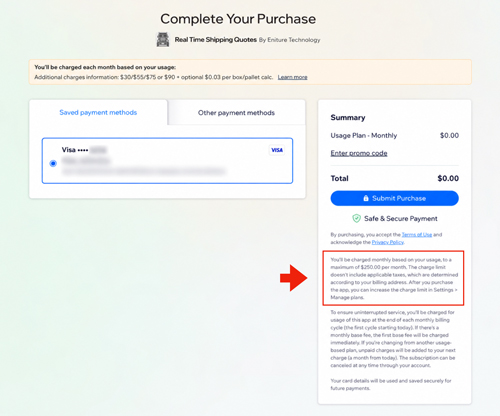
The initial $250 monthly charge limit includes both your fixed subscription fee and any optional packaging calculation charges.
It does not mean you will be charged $250 each month. Your actual charges depend on your selected subscription plan and the number of packaging calculations performed.
The limit is intended to protect merchants from unexpected usage charges.
Wix allows merchants to increase their charge limit through their Wix dashboard. Learn more in Wix's documentation on usage-based billing.
How Many Packaging Calculations Does the $250 Limit Allow?
The number of optional packaging calculations available before reaching the initial $250 charge limit depends on your subscription plan.
| Monthly Plan | Available for Optional Charges | Maximum $0.03 Calculations |
|---|---|---|
| $30 | $220 | 7,333 |
| $55 | $195 | 6,500 |
| $75 | $175 | 5,833 |
| $90 | $160 | 5,333 |
These figures represent individual packaging calculations, not completed orders or checkout sessions.
For example, a merchant subscribed to the $55/month plan could incur 6,500 individual packaging calculation charges before reaching the $250 monthly limit.
If both optional features perform calculations at multiple shipping origins, a single checkout can consume several calculations from the available allowance.
What Happens When the Monthly Charge Limit Is Reached?
When the monthly charge limit is reached, both optional packaging features stop functioning until the limit is increased or the next billing period begins.
Shipping quotes continue to be available at checkout. However, the methods used to prepare shipments for rating will change.
Parcel Shipping
When Box Sizes is unavailable, parcel shipping quotes continue to be generated using the alternative packaging method configured on the app's Box Sizes page.
These settings are global and apply to all active parcel integrations. They can be accessed by selecting Box Sizes from the app's navigation menu.
Depending on the selected method, the app may quote each item as a separate package or use another available packaging method.
The resulting shipping rate estimates may be higher or lower than the actual shipping charges.
For more information about alternative packaging methods, refer to the Real Time Shipping Quotes User's Guide.
LTL Freight Shipping
When Pallet Packing is unavailable, LTL freight integrations continue to request shipping rates using the freight classes and weights assigned to the products in the shopping cart.
These product-level settings are maintained in the app's Product Settings.
Merchants using traditional freight class and weight-based tariffs should generally experience no change in the accuracy of their LTL freight quotes.
However, merchants using dimensionally rated freight tariffs may receive inaccurate quotes because the app will no longer calculate the dimensions of the loaded pallets or handling units.
How to Increase Your Monthly Charge Limit
If you expect your packaging calculation charges to exceed the initial $250 limit, you can increase the limit from your Wix Workspace.
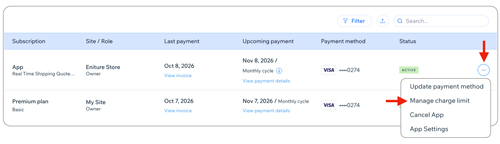
- Log in to your Wix Workspace.
- Navigate to Billing & Subscriptions → Premium Subscriptions.
- Locate the Real Time Shipping Quotes app in the subscriptions table.
- Open the More Options menu and select Manage Charge Limit.
- Enter your desired amount.
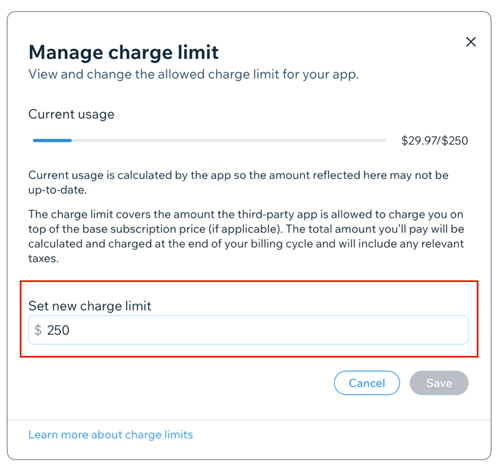
- Save your changes.
Increasing the charge limit allows the optional packaging features to continue operating beyond the previous limit. It does not change your fixed monthly subscription fee or the $0.03 per-calculation charge.
For additional information, refer to Wix's usage-based billing documentation.
Frequently Asked Questions
Will I be charged for packaging calculations if a shopper doesn't complete an order?
Yes. Packaging calculation charges are incurred when the optional features are used during checkout, regardless of whether the shopper completes the purchase.
Can a single checkout generate more than one packaging calculation charge?
Yes. Each shipping origin can independently generate Box Sizes and/or Pallet Packing calculations.
For example, if a shopping cart contains products shipping from three origins, and both parcel and LTL freight quotes are requested from each origin, the checkout could generate six packaging calculations, totaling $0.18.
Changes to the shopping cart during the same checkout session can trigger additional calculations and charges.
Do I need to enable the Box Sizes feature?
Box Sizes is optional but highly recommended for merchants using parcel shipping providers. Because parcel carriers generally charge based on the greater of actual or dimensional weight, accurately determining the dimensions of the packages used for shipping is important.
Without Box Sizes, the app uses the alternative packaging method configured on the Box Sizes page. Depending on the selected method, shipping quotes may be higher or lower than the actual shipping charges.
Do I need to enable the Pallet Packing feature?
Usually not. Most merchants using LTL freight providers have tariffs that calculate shipping charges based on freight class and weight. These merchants can leave Pallet Packing disabled and avoid the associated charges.
However, if your freight provider uses a dimensionally rated tariff, Pallet Packing is required to calculate the dimensions of the loaded handling units.
Will shipping quotes stop appearing if I reach my monthly charge limit?
No. Shipping quotes continue to be available. Only the optional Box Sizes and Pallet Packing features stop functioning until the charge limit is increased or a new billing period begins.
Can I increase my monthly charge limit?
Yes. You can increase the limit through the Manage Charge Limit option in your Wix Workspace.
Does increasing the monthly charge limit increase my subscription fee?
No. Your fixed monthly subscription fee and the $0.03 per-calculation charge remain unchanged. Increasing the limit only increases the maximum amount you authorize Wix to bill during the monthly billing period.
Where will these charges appear?
Both your monthly subscription fee and any optional packaging calculation charges will appear on your invoice from Wix. Wix collects these charges on behalf of Eniture Technology.