---
title: "Shopify \"Can't ship to your address\" Error"
description: "Understanding this error from Shopify: &quot;Your order cannot be shipped to the selected address.&quot;"
---

[Skip to content](https://support.eniture.com/shopify-cant-ship-to-your-address-error#main-content)

English

Show submenu for translations

[Open Support Ticket](https://support.eniture.com/kb-tickets/new?hsLang=en)

[![eniture\_w89\_h34.jpg\]](https://support.eniture.com/hs-fs/hubfs/eniture_w89_h34.jpg?height=40&name=eniture_w89_h34.jpg)](https://eniture.com/)

- [Open a support ticket](https://support.eniture.com/kb-tickets/new)
- [System status](https://status.eniture.com/)
- [Visit the blog](https://blog.eniture.com/)

Open main navigation

Close main navigation

- [Open a support ticket](https://support.eniture.com/kb-tickets/new)
- [System status](https://status.eniture.com/)
- [Visit the blog](https://blog.eniture.com/)
- English
  
  Show submenu for translations
- [Open Support Ticket](https://support.eniture.com/kb-tickets/new)
- [Contact us](https://eniture.com/contact/)

[Contact us](https://eniture.com/contact/)

 Hello. How can we help you?

- There are no suggestions because the search field is empty.

1. [Help Center](https://support.eniture.com/?hsLang=en)
2. [Shopify](https://support.eniture.com/shopify?hsLang=en)

September 29, 2026

# Shopify "Can't ship to your address" Error

## Understanding this error from Shopify: "Your order cannot be shipped to the selected address."

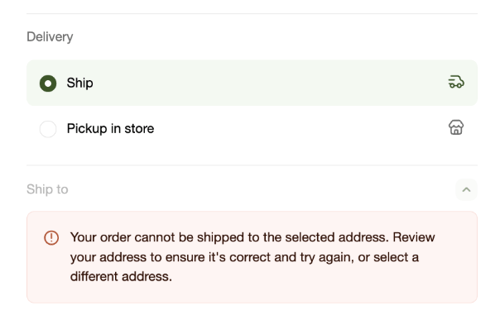
The "Your order cannot be shipped to the selected address" error appears in Shopify when it cannot retrieve shipping rate estimates during checkout. Despite its wording, this error rarely means there is a problem with the customer's address.
![](https://support.eniture.com/hs-fs/hubfs/image-png-Jul-18-2025-03-45-45-8532-PM.png?width=500&height=315&name=image-png-Jul-18-2025-03-45-45-8532-PM.png)

In most cases, the error indicates a misconfiguration in the shipping methods settings rather than a problem with the address itself.

If the address is valid, review the app's shipping configuration. Common things to check include:

- That at least one shipping method is enabled and correctly configured
- That the destination address falls within the zones or regions your shipping methods cover
- That your carrier account credentials (if applicable) are entered correctly and have not expired
- That your product weights and dimensions are filled in, as some rate calculations require them

You can also customize the error message Shopify displays to customers. Contact [Shopify Support](https://help.shopify.com/en/support) for help with this.

**Related articles:**  
[Why Aren't My Shipping Rates Showing Up On My Shopify Store](https://support.eniture.com/shopify-shipping-methods-page-missing-rates?hsLang=en)


- [General](https://support.eniture.com/general?hsLang=en)
- [FreightDesk Online](https://support.eniture.com/freightdesk-online?hsLang=en)
- [LTL Freight](https://support.eniture.com/ltl-freight?hsLang=en)
- [Small Package (Parcel)](https://support.eniture.com/small-package-parcel?hsLang=en)
- [Shopify](https://support.eniture.com/shopify?hsLang=en#main-content)

    - [LTL](https://support.eniture.com/shopify?hsLang=en#ltl)
- [WooCommerce](https://support.eniture.com/woocommerce?hsLang=en)
- [BigCommerce](https://support.eniture.com/bigcommerce?hsLang=en)
- [WIX](https://support.eniture.com/wix?hsLang=en)
- [Magento](https://support.eniture.com/magento?hsLang=en)

- [Open a support ticket](https://support.eniture.com/kb-tickets/new)
- [System status](https://status.eniture.com/)
- [Visit the blog](https://blog.eniture.com/)

[![Eniture Technology](https://support.eniture.com/hs-fs/hubfs/eniture_tech_orange_final_500x192.png?width=200&height=77&name=eniture_tech_orange_final_500x192.png "Eniture Technology")](https://eniture.com)

Eniture Technology Help Center

Copyright © 2025, Eniture Technology