![eniture_w89_h34.jpg]](https://support.eniture.com/hs-fs/hubfs/eniture_w89_h34.jpg?height=40&name=eniture_w89_h34.jpg)
Invite Eniture Support
- Sign in to Wix and open the dashboard for the site where the Eniture app is installed.
- Go to Settings
- Under the General heading → select Roles & Permissions
- Click the blue Invite Collaborators button in the top right corner.

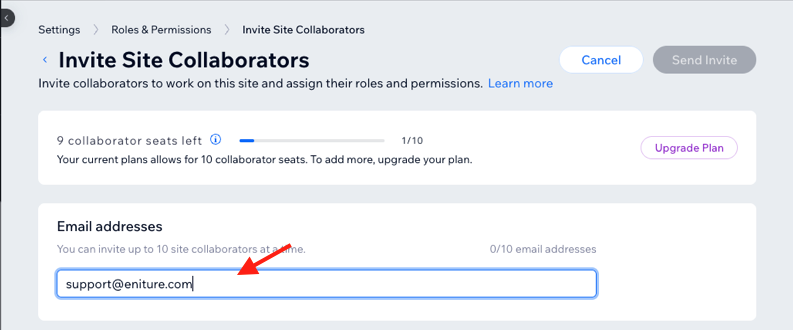
- Under Email Addresses enter support@eniture.com.
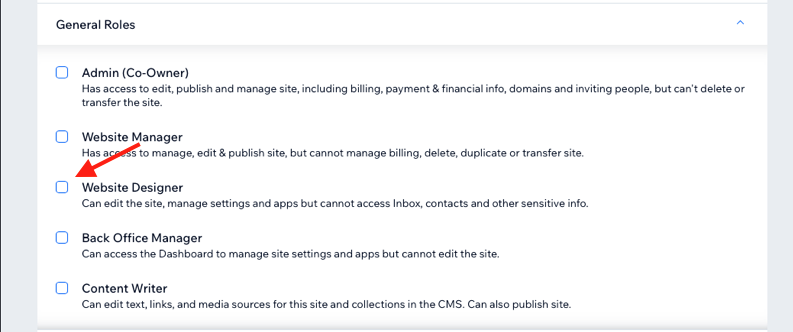
- Enable Website Designer in the list of General Roles.
- Scroll down to Stores Roles and enable Store Manager.

- If you have a role permission for App Market, enable Manage Apps. If not, scroll to the bottom of the roles list and click + Create Custom Role.
- Provide a name for the role, such as App Support, and a description.
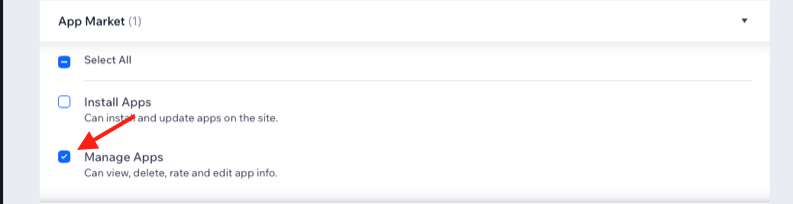
- Expand the option for App Market and enable Manage Apps.
- Click the Save button.
- Click the Send Invite button. If you're presented with a popup titled, Let us know how you're connected, choose the option to Skip, or choose An agency or freelancer who helps me build websites.
Once the Invite Is Sent
Reply to your Eniture support ticket and let us know. We can then accept the invitation and continue working on your request.
Please do not send us your Wix password or other login credentials.
Wix Help
Inviting People to Collaborate on Your Site
Creating and Managing Custom Roles for Collaborators