![eniture_w89_h34.jpg]](https://support.eniture.com/hs-fs/hubfs/eniture_w89_h34.jpg?height=40&name=eniture_w89_h34.jpg)
To cancel your subscription to the Real Time Shipping Quotes app, Wix recommends that you first cancel the subscription from your Wix Workspace and then delete the app from your store.
Both steps are important. Canceling the subscription disables automatic renewal, while deleting the app removes its functionality from your store. Deleting the app alone does not cancel your subscription.
Step 1: Cancel the App Subscription in Wix
- Log in to your Wix Workspace.
- Navigate to Billing & Subscriptions → Premium Subscriptions.
- Locate the Real Time Shipping Quotes app.
- Click the More Actions menu for the app and select Cancel App.
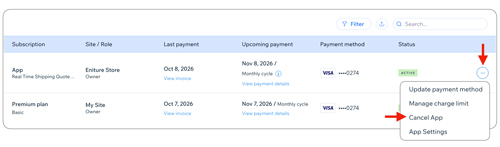
- Select Cancel auto renew and click Submit.
Canceling the subscription disables automatic renewal. Your subscription remains active until the end of the current billing period.
For additional information, see Wix's instructions for canceling an app subscription.
Step 2: Delete the App from Your Store
- Access your store's navigation menu in Wix.
- Navigate to Apps → Manage Apps.
- Locate the Real Time Shipping Quotes app.
- Click the More Actions menu for the app.
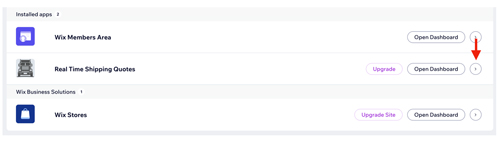
- Select Delete app.
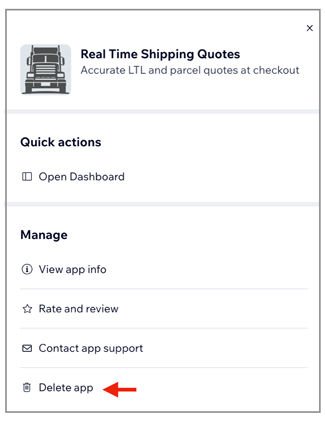
- Follow the prompts to confirm the deletion.
Deleting the app removes its shipping quote functionality from your store.
Important: Before deleting the app, make sure you have an alternative method for providing shipping rates at checkout. Otherwise, customers may be unable to complete checkout if no applicable shipping options are available.
For additional information, see Wix's instructions for deleting apps.
Final Billing
Wix manages billing and collects payments for the Real Time Shipping Quotes app on behalf of Eniture Technology.
Canceling your subscription prevents automatic renewal but does not eliminate charges already incurred. Your final billing may include the applicable monthly subscription fee and any outstanding usage charges for Box Sizes and Pallet Packing calculations performed before the app was removed.
Wix will process any remaining charges according to its billing procedures. For more information, see Understanding How Wix Processes Payments for Our Services.
Questions about your final invoice or payment processing should be directed to Wix Support.
Reminder: Canceling your subscription does not automatically delete the app, and deleting the app does not automatically cancel your subscription. Complete both steps to discontinue using the app and prevent automatic subscription renewal.