![eniture_w89_h34.jpg]](https://support.eniture.com/hs-fs/hubfs/eniture_w89_h34.jpg?height=40&name=eniture_w89_h34.jpg)
Shopify apps published by Eniture Technology that retrieve shipping quotes from parcel shipping providers like FedEx and UPS have an optional, powerful Box Sizes feature. The feature allows merchants to define the boxes they inventory and how the boxes are used operationally. This document provides common examples of how the Box Sizes feature is used to achieve specific outcomes.
The Box Sizes settings reside in two locations. The first location is on the Box Sizes page in the app settings. There, when defining a box, you can specify whether the box is generally available for use during the packing operation or is available only for specific products.

The second location is on the product-shipping-parameters page. There, you can specify how a product can be packaged for shipping.
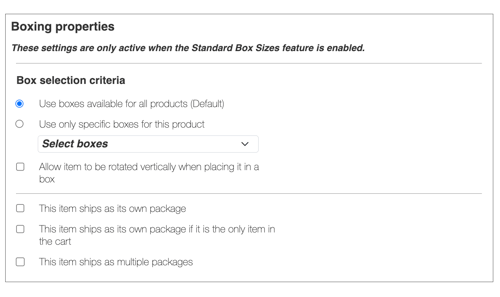
Below are examples of how to use the settings to achieve common packaging goals.
How Do I Make Any Box Available for Any Product?
If your inventory of boxes can be used to package the content of (just about) any Cart, then...
- On the Box Sizes page, select the option for Available for all products.
- On the product-shipping-parameters page, select the option for Use boxes available for all products.
- On the product-shipping-parameters page, enable the setting Allow item to be rotated vertically when placing it in a box. This gives the packaging algorithm the most flexibility. You should always enable this setting unless you intend to ship the product in a box with the "This End Up" stipulation.
How Do I Reserve Certain Boxes for Specific Products Only?
You may have certain boxes that shouldn't be considered available for use when packaging orders of general merchandise. For example, perhaps you have a box that is designed specifically for use with ice packs when you need to ship perishable merchandise. The box may be expensive, and you may want to reserve it for use only when shipping perishable items.
- On the Box Sizes page, for any box you want to reserve for specific products, select Available only for specific products.
- On the Product Shipping Parameters page, select Use boxes available for all products for general merchandise products.
- On the Product Shipping Parameters page, enable Allow item to be rotated vertically when placing it in a box. You should always enable this setting unless you intend to ship the product in a box with the "This End Up" stipulation.
This will remove the reserved box from the pool of generally available boxes so it can't be used for all orders. The remaining boxes — those with the Available for all products setting enabled — will continue to be available for general merchandise.
How Do I Restrict a Product to Ship Only in Certain Boxes?
You can specify that a product can only ship in certain boxes. Don't confuse this with size constraints. The packaging algorithm will already account for the size of the product and which boxes are sufficiently large to accommodate it.
In this example, you may have several boxes that are sufficient in size, but only one or a few of them should be used to package the product. Perhaps how these boxes are engineered makes their use mandatory for shipping the product.
- On the Box Sizes page, the Box availability setting can be set to Available for all products or Available only for specific products. Which of these two options to choose will depend on whether you want the box available for use for other products in your product catalog.
- On the product-shipping-parameters page, use the dropdown field Use only specific boxes for this product to identify which boxes are permitted. To make multiple selections, hold down the COMMAND button on a Mac or the CTRL button on a PC.
- On the product-shipping-parameters page, enable the setting Allow item to be rotated vertically when placing it in a box. This gives the packaging algorithm the greatest flexibility. You should always enable this setting unless you intend to ship the product in a box with the "This End Up" stipulation.